Having a small character LCD hooked up to a computer isn’t really a novel idea.
They became popular on servers, which often run without monitors attached, to
convey vital system status information to technicians. In more recent years,
they have become popular in custom-built PCs. I wanted one on my desk because
there are often small notifications that I want to be accessible at all times,
but not the center of my attention. On-screen notifications, such as icons in
the GNOME panel, the Windows system tray, or Growl on Mac OS X work fairly
well, but only if I’m sitting at my computer and have the monitors turned on.
An external notification device is able to convey this information without a
large display.
I could have purchased a pre-built unit; they exist both as displays that fit
into an empty expansion bay on the front of a PC, or separate desktop units.
However, my aesthetics don’t always match up with the PC-modding community (I
tend to prefer things simple and understated rather than bright and flashy; I
don’t want my PC to look like the typical “gaming rig”).
Building things yourself is great because you get to decide exactly how it’s
going to look and work. I also chose to add 3 RGB LEDs to the device—many small
bits of information are binary, such as having a new e-mail message. The LEDs
provide a great way to convey information like this, and they’re meaningful
from across the room. Using RGB LEDs makes them customizable, or allows
information to be encoded in the color of the indicators.
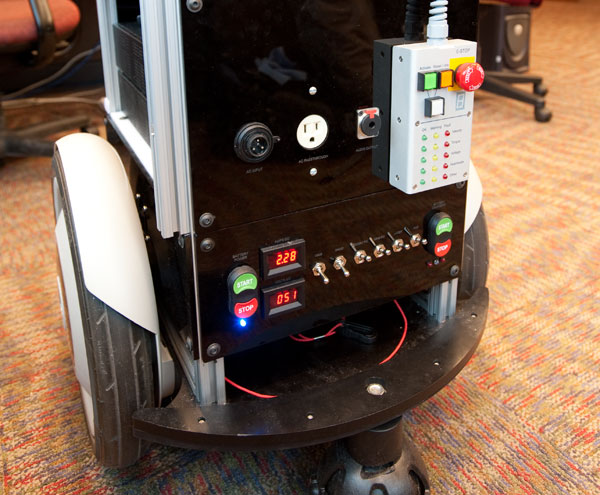
In order to construct Intel Labs Seattle’s mobile robotics platform, MARVIN, I
needed to build a power system to supply the DC voltages required by the
different components of the system. I used nickel-metal hydride battery packs
as the battery power source and VICOR DC-DC converters to provide the various
required voltages. The control panel on the rear of the robot is laser-cut
acrylic and provides control over battery power, battery chargers, power to
individual system components, and battery current and voltage monitoring.
One of the important features of the design is an onboard AC to DC power
supply. This allows the robot to run indefinitely from a single tether, which
plugs into a standard electrical outlet; no external power supply is needed.
The system switches seamlessly between wall and battery power when wall power
is connected or disconnected, so no part of the system needs to be shut down to
connect or disconnect power. Onboard chargers enable the robot to recharge its
batteries while it is plugged in.
MARVIN's rear control panel. The power module controls are at the bottom.
UW Classroom Presenter,
developed by Richard Anderson et al. at the University of Washington, is
interactive presentation software that runs on tablet PCs. Each student uses
his or her own tablet PC, can see written annotations made on the slide by the
instructor (called “ink”) and can add his or her own ink to slides which can be
submitted back to the instructor to be reviewed or shared with the class. In my
undergraduate capstone project at the University of Washington, I worked with
several other students to develop a version of Classroom Presenter that runs on
the One Laptop Per Child foundation’s XO laptop.
The software is not just a port but a complete adaptation to make it usable on
the XO. The XO is not a tablet, so only simple drawing with the trackpad (or a
mouse) is possible. We added text input features to enable students to provide
a textual response to a question without needing to write it with a mouse. We
use the XO’s built-in facilities for discovering shared activities and
connecting to other machines, so that connecting the machines together is
simple enough for elementary students to do themselves. We also included
features necessary for setups that don’t include a projector: the original UW
Classroom Presenter expects that if the teacher wants to share a student’s
submission with the class, he or she will use a projector to display it. In our
implementation, we enable the teacher to broadcast selected student submissions
to the rest of the class, so students may view them on their own screens.
The project culminated in a trial at a local elementary school, where students
in small groups shared XO laptops to complete activities about a recent field
trip, while the teacher talked about the students’ work and shared their
submissions with the rest of the class.